Keep your finger on the pulse of your people

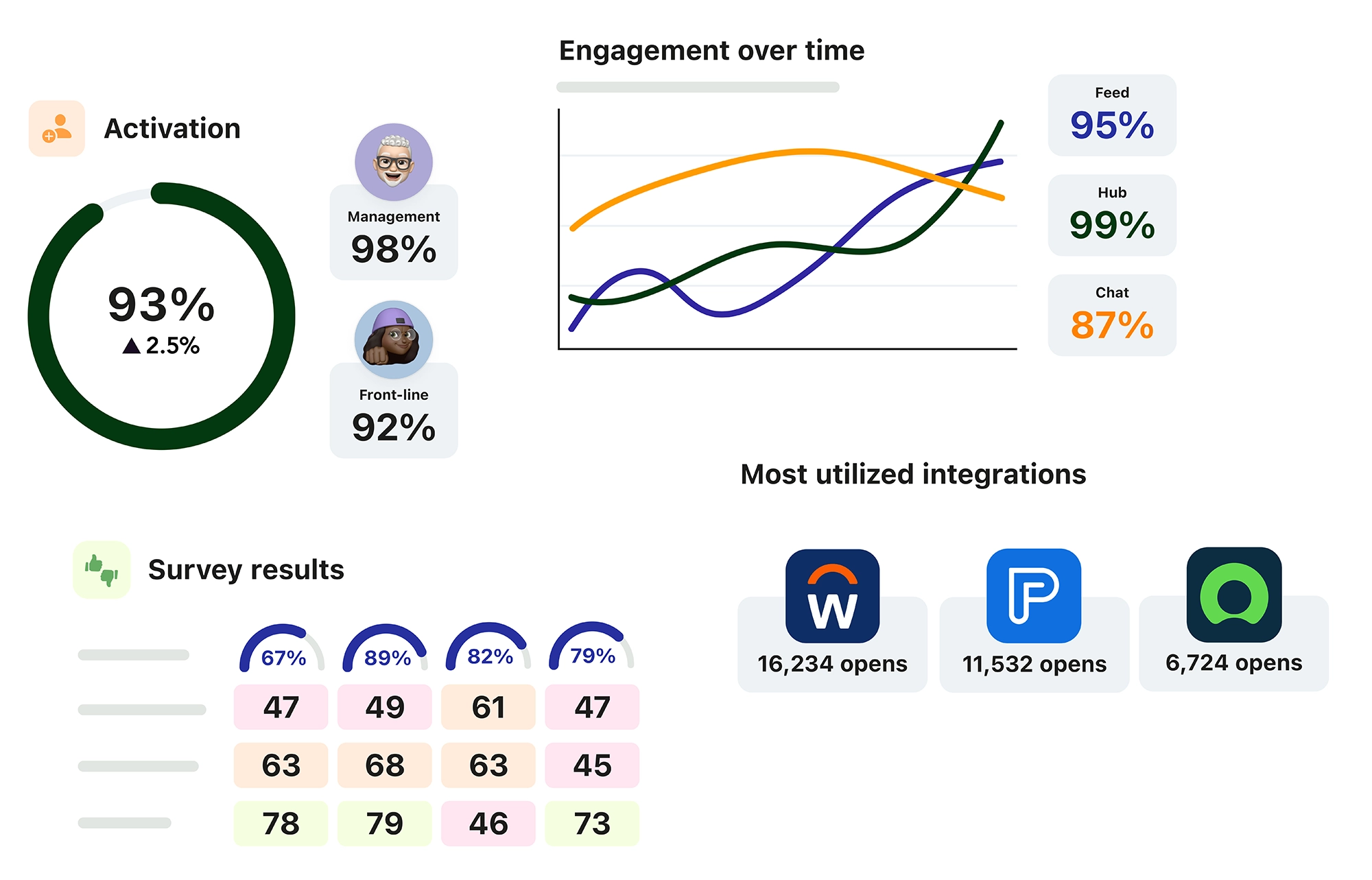
Blink’s powerful analytics offers insight into the people and relationships that your organization runs on, getting you the right data at the right time to improve your employee experience.
Understand your workforce

Our comprehensive platform paints a full picture of your people. It’s more than usage analytics — we also dive into engagement, sentiment, and the link to employee turnover. These actionable insights can transform your culture and yield impactful return on investment.

See the metrics that matter

Enable your internal communications professionals, HR teams, and people managers to see the analytics of each post without leaving the app. View the reach, impressions, likes, comments and link clicks of any post in your feed.

Distribute and gamify insights

We know that not everyone has the time or motivation to look at dashboards. By automating and distributing team insights, you can seamlessly promote healthy competition through our news feed.

Reduce costly turnover

Does your organization struggle with early employee turnover? Get ahead of it through check-in surveys to your new hires — making it easier than ever to understand why these employees are leaving and how you can reverse the trend.

Protect your privacy

Our analytics help everyone work smarter — but never at the expense of individual privacy. Blink ensures all sensitive data remains hidden and never gives inappropriate access to an individual’s data.

“Our compliance rate has gone up because people are actually receiving our messages, which in turn increases all of the KPIs that we're measuring on a daily basis.”

Brittney Schlachter, Communication Specialist · The Rapid

Explore Blink features

Modern social

Help every employee stay informed, connected, and empowered by bringing the energy of social apps into the workplace.


Stories

Give employees shared virtual spaces where they can connect and collaborate.

Single sign-on

One-click access to all your applications from within Blink. Secure SSO that IT, security, and users will love.

Hub

Put policies, procedures, and guides in one convenient place.

News feed

Connect the organization with an intuitive, engaging news Feed.

Integrations

Deliver your existing tools to all of your employees. Drive software adoption and empower staff to succeed.

Secure chat

Make conversations seamless with Chats on Blink.

Digital forms

Create and distribute forms, gather data, and automate key processes.

Blink assist

Blink assist helps every employee create, edit, and refine their communications with confidence.

Recognition

Send instant, personalized recognition to every employee and/or team with Blink Kudos.

Surveys

Build single- or multi-question surveys within Blink — and send them directly to employees.

Analytics

Gain insights and data on the people and teams in your organization to improve your employee experience.

Employee journeys

Deliver personalized content paths to enhance onboarding, training, and other experiences within Blink.

Communities

Give employees shared virtual spaces where they can connect and collaborate.

Manager-led activation

Efficiently guide new employees through the onboarding process.

Events

Bring people together and build culture, wherever your workforce is.

Smarter, more relevant communication

Laptop and smartphone displaying the Blink app interface with vacation policy text on the laptop and suggested tools and quick links on the smartphone.

Relevance over recency. Intelligence built in.

Smart Feed introduces a recommended feed experience that prioritizes relevance over strict publish time. Instead of relying on manual ordering, the feed adapts to organizational goals and surfaces content based on what matters most to each user. The result is a more personalized experience at scale — helping employees see what’s most relevant, at the right time, without additional admin effort.
Screenshot of a priority alert about a scheduled electricity outage from Connor Rempel, General Manager, advising the team to prepare for the outage at 2pm tomorrow, displayed over a company update message from Harriet McGee.

No signal? No problem.

Offline Mode allows employees to save Hub content and Feed posts for access without connectivity on mobile. Saved content is available centrally, syncs automatically when reconnected, and downloads are WiFi-first by default. Admins retain control over sensitive content using protected settings. Critical information is now accessible anytime, anywhere — even on the frontline.
Analytics dashboard showing employee satisfaction score 5.6, user activity graph with 90% active users, feed interactions over time, and feed engagement statistics.

One post. Extended reach.

Email Delivery enables organization admins to send a published Feed post as an email directly from Blink. Posts can be sent to an entire group or only to users who haven’t read the update. Each email includes a preview, first image, and a call-to-action linking back to Blink. This strengthens delivery, increases visibility of critical communications, and supports multichannel engagement without duplicating effort.

Deeper interoperability across enterprise systems

Laptop and smartphone displaying the Blink app interface with vacation policy text on the laptop and suggested tools and quick links on the smartphone.

Approve in one tap. No system switching.

Workday notifications now surface directly within the Blink Feed, allowing managers to approve or deny leave requests in one tap. Employees receive real-time updates about their requests without logging into Workday separately. By embedding actions directly into the Blink experience, organizations accelerate approval turnaround times and reduce context switching between systems.
Screenshot of a priority alert about a scheduled electricity outage from Connor Rempel, General Manager, advising the team to prepare for the outage at 2pm tomorrow, displayed over a company update message from Harriet McGee.

HR tasks, surfaced daily.

The SAP SuccessFactors Daily Digest delivers a Blink notification when new tasks are waiting in SuccessFactors. The notification displays the number of pending items and links directly to the system to take action. Delivered once daily at a configurable time, the digest improves visibility of training, assessments, and acknowledgements while minimizing system hopping.
Analytics dashboard showing employee satisfaction score 5.6, user activity graph with 90% active users, feed interactions over time, and feed engagement statistics.

Tasks surfaced. Deadlines met.

Workday Digests provide daily or weekly summaries of open Workday tasks directly within Blink. Notifications are triggered only when items exist, ensuring important actions aren’t buried in an inbox. By bringing reminders into everyday workflows, organizations reduce missed deadlines and support proactive task management.

Safer, more confident communities at scale

Laptop and smartphone displaying the Blink app interface with vacation policy text on the laptop and suggested tools and quick links on the smartphone.

Right people. Right spaces.

Communities can now be set to require admin approval before new members join. Closed communities display a “Request to Join” option, and admins can approve or decline requests on web or mobile. This ensures the right people are in the right spaces and supports executive, HR, and confidential groups as organizations scale.
Screenshot of a priority alert about a scheduled electricity outage from Connor Rempel, General Manager, advising the team to prepare for the outage at 2pm tomorrow, displayed over a company update message from Harriet McGee.

Growth — with guardrails.

Employees can submit a request to create a new community, subject to admin approval. Group creation is managed through organization-level settings, giving admins visibility and control before new spaces are launched. This supports structured growth while preventing uncontrolled group sprawl.
Analytics dashboard showing employee satisfaction score 5.6, user activity graph with 90% active users, feed interactions over time, and feed engagement statistics.

Proactive moderation. Built in.

Automated Keyword Blocking allows organization admins to define a single, organization-wide blocklist that prevents specific words or phrases from being sent in chats and feed comments. Messages are checked client-side before posting, and users receive immediate feedback if blocked terms are detected. This proactive moderation tool helps reduce compliance risk and maintain professional standards across communities.

Trusted by the world's leading brands

McDonald's Golden Arches logo
Holcim
JD sports Group logo
easyJet logo
Dominos
Stage Coach
Nokia
Elara Caring
Chick-fil-A logo
Ennismore logo
Carrefour logo
shakeshack logo

What kind of analytics does Blink provide?


Blink offers real-time analytics on platform usage, content engagement, communication reach, overall sentiment, and employee feedback — giving leaders the insights needed to improve internal comms and engagement.

Can I see which messages or campaigns perform best?


Yes. Blink’s analytics show which Stories, Surveys, or News Feed posts have the most reach, reactions, and comments — so you can discover what’s performing best and optimize your communications strategy over time.

Are analytics broken down by teams or locations?


Absolutely. Blink’s dashboards allow filtering by department, role, or geography, making it easy to spot trends, identify communication gaps, and compare engagement across the organization.